 By networkesblog
RGB lighting has evolved from being just a cool gimmick to a staple in custom PC builds. It adds character, improves aesthetics, and enhances your entire gaming or workspace setup. However, as your ambitions grow, so do your lighting needs. A common challenge many builders face is figuring out how to connect long RGB strips to motherboard without overloading the system or facing flickering and brightness issues.
If you’re looking to install longer strips or multiple RGB zones in your PC case, desk setup, or even your room—all controlled through your motherboard—this guide is for you.
Before you start connecting anything, it’s crucial to understand the two main types of RGB headers on modern motherboards:
- Controls all LEDs on the strip at once.
- Only allows one color to be shown across the entire strip at any given time.
- Often labeled as RGB_LED1, 12V-G-R-B.
- Addressable RGB – each LED can be controlled independently.
- Supports dynamic effects like wave, rainbow, or reactive lighting.
- Labeled as D_LED, ARGB1, or similar with 5V-D-G.
Important: Never mix a 5V ARGB strip with a 12V RGB header or vice versa. This can permanently damage the LEDs or the header.
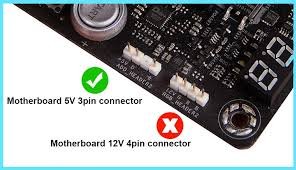
Motherboard RGB headers are designed to support moderate-length LED strips—not entire rooms or long case wraps. Exceeding these limitations can lead to:
- Voltage drops (dimmer LEDs at the far end)
- Overheating wires or LED controllers
- Flickering or failed LEDs
- Damaged motherboard RGB headers
- 12V RGB: Max 2–3 meters (~60 LEDs)
- 5V ARGB: Max 1–1.5 meters (~60–120 addressable LEDs)
Always check your motherboard’s manual or specs sheet to verify the maximum amperage allowed per header.
Let’s break it down into actionable steps:
Before anything else:
- Identify whether your RGB strips are 12V RGB or 5V ARGB.
- Verify your motherboard has matching headers.
- Check the power rating (usually in watts or amps) of the RGB header.
If you’re using long strips or multiple strips, your best bet is a powered RGB hub/controller. These devices:
- Accept signal input from your motherboard.
- Draw additional power directly from your PSU (SATA or Molex).
- Distribute power evenly across multiple RGB outputs.
- Prevent motherboard overload.
- Corsair Commander Pro
- Cooler Master Addressable RGB Controller
- SilverStone LSB02
- DEEP COOL RGB Convertor
Many of these sync with popular motherboard software like ASUS Aura Sync, MSI Mystic Light, ASRock Polychrome, and Gigabyte RGB Fusion.
For very long runs of RGB strips (e.g., full desk or room lighting), RGB amplifiers come in handy.
- They take the signal from your motherboard and amplify it.
- Draw power directly from your PSU.
- Ideal for daisy-chained LED runs or large case mods.
Pro Tip: Chain multiple amplifiers if you plan to exceed 5+ meters of RGB.
Many RGB strips support end-to-end daisy chaining, but you should:
- Stay within the safe power limits.
- Use an amplifier if you go beyond 3–5 meters.
- Keep connectors secure to avoid signal loss.
RGB and ARGB connectors have a specific direction:
- Align the arrow on the connector with the 5V or 12V marking on your motherboard.
- Incorrect orientation can short the LEDs or cause them not to light up.
Use RGB extension cables, cable combs, or cable management ties to route everything neatly.
- One ARGB strip inside the case (1.5m max)
- Powered from motherboard ARGB header
- 2–3 RGB strips inside the case + 1 strip behind monitor + desk edge
- All connected to a powered RGB hub
- Controlled via motherboard software
- 5m+ ARGB strip behind furniture or walls
- Powered by RGB amplifier (not motherboard)
- Controlled using signal from motherboard and remote/app
- Don’t mix different brands unless they support the same control protocol.
- Avoid cheap, non-PC-grade RGB strips—they may not sync or dim properly.
- Use diffuser channels (aluminum or plastic) to hide LED dots and enhance light blending.
- Consider PWM fans with built-in RGB to simplify cable management.
- If RGB strips heat up significantly, reduce brightness or improve airflow.
Yes, but only if the total power draw doesn’t exceed the header’s limit; otherwise, use a hub.
Use motherboard software like ASUS Aura Sync or MSI Mystic Light, or a third-party controller with PC sync support.
Yes—just make sure the total amperage draw of connected devices is within the safe limit.
No, ARGB (5V) and RGB (12V) are electrically and functionally different.
Use adhesive backing, zip ties, or magnetic clips; keep strips away from fans and hot spots.
Connecting long RGB strips to your motherboard doesn’t have to be complicated—it just requires the right knowledge and hardware. With a clear understanding of your RGB headers, safe power limits, and tools like powered controllers and amplifiers, you can easily light up your entire case, desk, or room while maintaining sync with your PC.
Always check your motherboard’s specs, never exceed power limits, and use quality components. Done right, your RGB setup will not only look amazing but run reliably for years to come.
How Many USB Ports Does My Motherboard Have
How Can I See What Motherboard I Have
Computer Motherboard Sizes: Everything You Need to Know Before You Build